
Help: set up a camera or phone
This page walks you through adding a phone or a Raspberry Pi, and explains what the buttons do. It takes about two minutes for a phone.
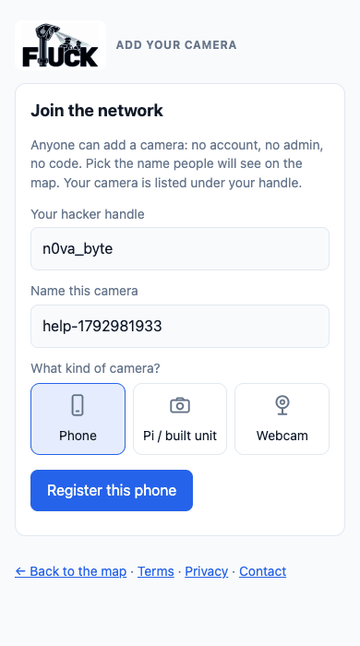
Add your phone
- Open the registration page on your phone (it must be the secure
https://address, or the phone won't share its location). Pick a hacker handle and a name for the phone, tap Register this phone. - Allow location when the browser asks. Without it the app can't tell where a report happened.
- Install it so it opens like an app: on Android tap Install the app in the page (or the browser menu → Install app); on iPhone tap Share → Add to Home Screen.
- Mount the phone or let a passenger use it. Keep Keep screen on ticked. Never use it while driving.
The two buttons
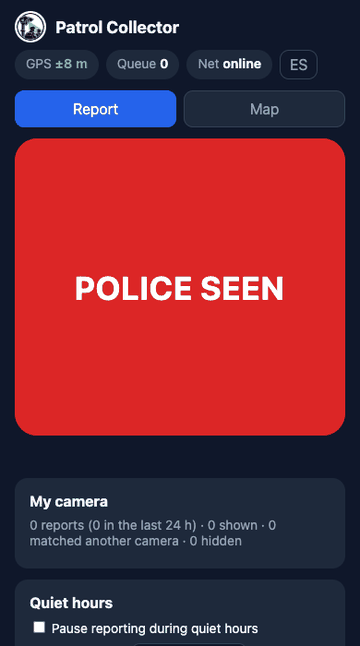
- POLICE SEEN (in the phone app) records a sighting. It is delayed (currently 3 minutes) and blurred before anyone sees it, like every sighting. It also drops a live pin for other people when you have signal. You get 8 seconds to undo.
- Tag police (on the map, for everyone) drops a live pin with no plate and no identity. It shows now, disappears after about 45 minutes, and other people can say still there or gone.
Useful settings in the phone app
- Quiet hours: set a time window (for example 23:00–06:00). During it the app neither reports nor checks in, so your phone shows as offline. Reports queued earlier still upload.
- Show this phone on the public map: off by default. When on, a blurred dot shows while the app is open.
- My camera: shows how many of your reports were accepted, matched another camera, or hidden. If too many are hidden after flags, your phone stops counting towards plate confirmation, so report only what you actually see.
- No signal? Reports wait in the phone and upload by themselves when signal returns (on Android Chrome even if the app is closed).
Add a Raspberry Pi or a webcam
- On the registration page choose Pi / built unit or Webcam and copy the one-line command it shows.
- Run it once on the device from the FlUck
gateway/folder. It saves its own key (readable only by you). - Start it:
python3 gateway/pipeline.py --source pi --gps gpsd(or--source webcam:0 --gps fixed:LAT,LON). - Useful options:
--quiet 23:00-06:00(quiet hours),--evidence(attach a small private photo of the police vehicle for the owner's review),--self-update(fetch gateway updates from this site),--auto-exposure(better night and glare handling).
Help check unsure detections
When a camera is not sure what it saw but sent a small photo, anyone can look at it on the review page and vote yes (a marked police vehicle), no or skip. When a few people agree it goes on the map or is thrown away, and the photo is deleted at once.
Following, patterns and downloads
- Follow a car or a ZIP area from the map: by e-mail (instantly or as a daily digest) or as a browser notification. Everything is delayed like the map itself, so it is never live.
- Compare two cars: type two plates in the search box (for example
TEST001 TEST002). - Patterns shows when and where sightings cluster. CSV / GeoJSON downloads are under the Data links, under the Open Database Licence.
- Language: the ES / EN button switches the map and the phone app between Spanish and English.
Questions
Why don't I see a plate on a sighting?
A plate is shown only after two different people have reported it, so one mistaken or malicious report can't put a name on a car. Sightings of the same car by two cameras at the same moment count as one pin.
Why was my report hidden?
Sightings that several visitors flagged are hidden until the site owner has looked, and unsure detections wait for a check. You can see the counts under My camera.
Something is wrong or should be removed
Use the report form. A person reads every request.
Is it legal?
See the About page (it is not legal advice).